In brief
The trend of open data i.e. data to be freely available to everyone to use and republish as they wish until recently was not obvious in the IoT wearable industry. Consumable wearable industry quite often enables restrictions and limits even when it comes to the use of your own health related data (e.g. see
Withigs Terms of Use - 7. Duration - Termination - Free of charge).
Another alternative could be the usage of wearable devices that allow you to get your personal health data directly from the device i.e via Bluetooth.
Infrastructure and the Angel Sensor
The
Angel Sensor is a wearable designed to allow direct access via Bluetooth. In short, the AGL-M1 model has sensors to measure the temperature, the heart rate, the acceleration, and the blood oxygen saturation (under development) .
In this tutorial, we will try get the temperature measurements by using a raspberry pi 3 running Raspbian Jessie Lite.
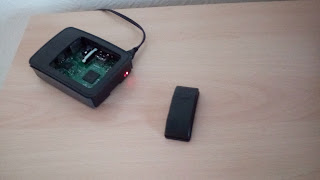 |
| The raspberry pi 3 and the Angel Sensor M1 |
Steps
The code is stored at a public repo at GitHub.
1. Get a clone of the repository
$ git clone https://github.com/vaggos2002/py-angel-sensor
2. Change your current directory
$ cd py-angel-sensor
3. Install the required libraries on your raspberry pi 3 :
$ sudo apt-get install pip
$ sudo pip install requirements
4. Press the Angel Sensor button to start the Sensor.
5. Run the code
$ ./temp.py -a '<angel sensor mac address >'
e.g. : ./temp.py -a '00:07:80:02:F3:8C'
After the last step, you should start to see at your terminal the temperature in Celsius :
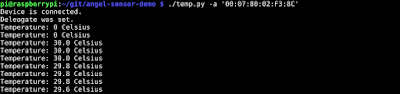 |
| Expected outcome of the script |


